80 Monochrome Seamless Backgrounds for Design
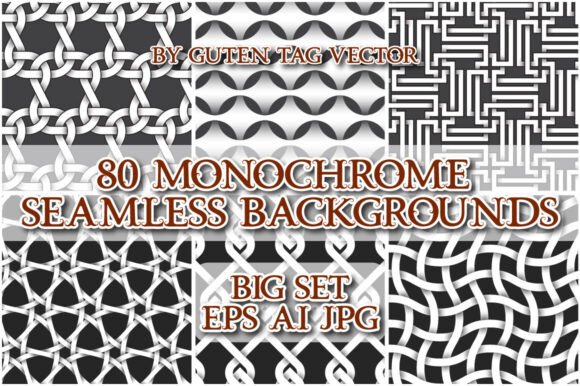
There is a specific kind of freedom that comes from removing color. When you strip away the spectrum, you are left with form, texture, and rhythm. 80 Monochrome Seamless Backgrounds offers exactly this: a curated collection where the absence of hue becomes the primary driver of visual interest. This isn't just a pile of gray images; it is a toolkit for designers who need to establish mood without distraction. Whether you are working on a minimalist brand identity or creating a textured backdrop for a blog post, these patterns provide a solid foundation.
The collection includes 80 distinct vector files in EPS10 and AI10 formats, alongside high-resolution JPGs. The versatility here lies in the seamless nature of the tiles. You can drag them directly into your swatches panel and extend them infinitely across any canvas size. This means no more worrying about visible seams when scaling up a background for a billboard or scaling down for a mobile app icon. The consistency remains intact regardless of the output dimension.
Why Monochrome Still Matters in Modern Design
In an era dominated by vibrant gradients and neon aesthetics, monochrome might seem like a step backward. However, experienced creatives know that simplicity often commands the most attention. A monochrome palette forces the viewer to focus on the composition itself. It removes the cognitive load of processing multiple colors, allowing the message to land with greater clarity.
Using 80 Monochrome Seamless Backgrounds allows you to create designs that feel timeless rather than trendy. Trends fade quickly, but the interplay of black, white, and gray endures. These patterns work exceptionally well as supporting elements. They can ground a chaotic layout or provide a sophisticated texture behind bold typography. When you use these backgrounds, you aren't just filling space; you are adding depth through subtle variations in tone and pattern density.
Practical Applications for Different Creators
Different professionals approach design with different goals, yet this set adapts seamlessly to various workflows. Here is how specific roles can leverage these patterns:
- Graphic Designers: Use the vector files to create custom packaging or print collateral. The rectangular tile structure makes it easy to align patterns with bleed lines and crop marks. You can overlay text directly onto the patterns to create high-contrast headlines that pop without needing heavy drop shadows.
- Web Developers & Bloggers: Implement the JPG versions as background textures for section dividers or hero banners. Because they are seamless, you can apply them using CSS tiling properties to ensure they cover large screen widths without pixelation. This adds a tactile feel to digital interfaces that pure flat colors lack.
- Social Media Managers: Create consistent story highlights or post templates. A monochrome background ensures that user-generated content or colorful product shots stand out immediately. It acts as a neutral stage for your brand's narrative.
- Small Business Owners: If you are designing flyers, invoices, or business cards, these patterns add a layer of professionalism. They elevate "boring stuff" into branded assets without requiring expensive photography or complex illustrations.
Technical Workflow and Integration
The value of this archive extends beyond the visual appeal; it is also about efficiency. The inclusion of both EPS10 and AI10 files ensures compatibility with industry-standard software like Adobe Illustrator, CorelDRAW, and Affinity Designer. The ability to drag a pattern tile directly into the swatches panel is a workflow saver. Instead of manually repeating objects or defining complex patterns, you have instant access to a library of textures.
For those working with raster-based tools, the 80 accompanying JPG files provide immediate usability. These are perfect for quick mockups, photo editing overlays, or projects where vector scalability isn't required. The key to maintaining quality is understanding the resolution of the source file. While the vectors offer infinite scalability, the JPGs should be used at their native resolution to avoid blurring when stretched too far.
When organizing your project files, consider grouping the patterns by complexity. Some designs benefit from subtle, almost imperceptible textures, while others demand bold, graphic contrasts. By sorting your swatches accordingly, you can maintain a clean workspace and reduce decision fatigue during the creative process.
Creative Strategies for Unique Results
To get the most out of 80 Monochrome Seamless Backgrounds, you must look beyond simply applying the pattern to a rectangle. The magic happens when you modify the application. Try adjusting the opacity of the pattern layer to create a watermark effect. This technique is excellent for adding texture to portraits or product photos without obscuring the subject matter.
You can also combine multiple patterns from the set. Layering two different monochrome tiles with different blending modes—such as Multiply or Overlay—can generate entirely new textures that do not exist in the original archive. This experimentation allows you to create a proprietary look for your brand. For instance, mixing a geometric grid with a fluid organic shape can result in a dynamic, modern aesthetic suitable for tech startups or fashion brands.
Typography interaction is another powerful avenue. Place bold, sans-serif fonts over the patterns to test legibility. In many cases, the contrast provided by the pattern will allow you to use smaller font sizes while maintaining readability. Conversely, thin, elegant serif fonts paired with a dense, dark pattern can evoke a sense of luxury and heritage. The flexibility of the monochrome palette means you can shift between these moods instantly.
Maintaining Consistency and Originality
One of the challenges in using stock resources is ensuring the final output doesn't look generic. To keep your results original, treat these patterns as ingredients rather than the entire meal. Combine them with unique photography, custom illustrations, or hand-drawn elements. The goal is to create a cohesive system where the background supports the content rather than competing with it.
Consistency is key when building a brand identity. Select three or four patterns from the set that share a similar visual weight and use them across all your touchpoints. Whether it is a website header, a presentation slide deck, or a printed brochure, sticking to a limited selection of monochrome textures creates a recognizable visual language. This restraint signals confidence and attention to detail.
Remember that less is often more. A busy pattern can overwhelm a message. If your content is data-heavy or text-rich, choose a lighter, more open pattern from the collection. If you are showcasing a single powerful image, a darker, denser pattern can frame it effectively. The choice depends entirely on the hierarchy of information you wish to convey.
Final Thoughts on Creative Potential
This collection represents more than just a download; it is a resource for problem-solving. It provides a solution for the common design dilemma of "what goes in the empty space?" With 80 distinct options, you likely won't run out of ideas. The monochrome theme ensures that whatever you create will remain focused, professional, and visually striking.
Whether you are revamping an old website, launching a new product line, or simply looking for inspiration to break out of a creative rut, these patterns offer a reliable starting point. Embrace the constraints of black and white to unlock new levels of creativity. By integrating these seamless backgrounds thoughtfully, you can transform ordinary projects into extraordinary designs that resonate with your audience.